DNS Record Types Explained

What DNS is (explained in very simple terms)
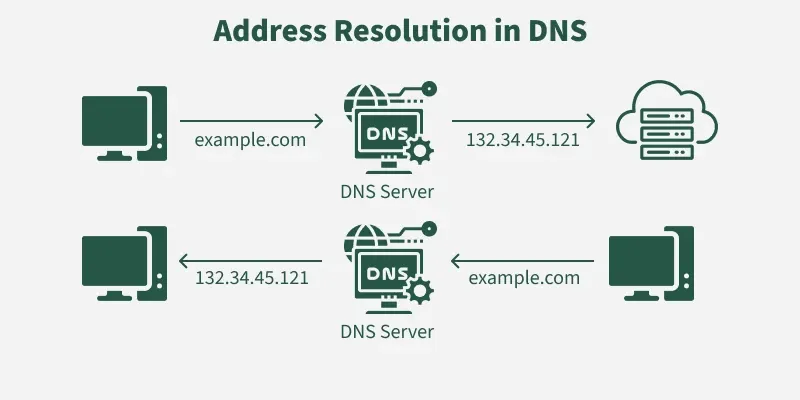
DNS stands for domain name system.
It is the internet’s phonebook.
Whenever you type google.com on your browser it does not understand what is it . Browsers cannot access the website using the domain name . They need the IP address of the domain to go and access it
SO , Computers does not understand names like google.com .
They understand IP like 142.250.183.14.
So what does DNS do??
DNS converts the Domain name into an IP. Without DNS you would have to remember the IP of all the websites you want to visit.
Why DNS records are needed
DNS is just all about IP.
A website may need various things like:
Web server
Email server
Sub-domains
Security systems , TXT files
So Basically , DNS tells the internet everything they would want to know about a domain.
What an NS Record is (who is responsible for a domain)
NS = Name Server
This record returns us the servers that are responsible for managing the DNS of a particular Domain.
NS record tells the server that who is the boss of this domain.
It tells that us who controls a domain’s DNS settings.
Example :-
example.com
So when someone asks about your domain, the internet says:
“Ask these name servers — they have the answers.”
What an A Record is (domain → IPv4 address)
A record = Address Record
This records returns us the IPv4 address of a website
example.com → 93.184.216.34
What an AAAA Record is (domain → IPv6 address)
It is same as the A record but it gives us the newer IP version.
This records returns us the IPv6 address of a website
example.com → 2400:cb00:2048:1::c629:d7a2
What a CNAME Record is (one name pointing to another name)
CNAME = Canonical Name
This records returns us the real domain name and that domain’s A record may have the IP address of the main server.
alias domain (CNAME) → real domain → IP address
What an MX Record is (how emails find your mail server)
MX = Mail Exchange
This record returns the MAIL SERVER NAME where we want our mails to reach.
Let’s say someone sends:
To: user@example.com
Sender’s mail server checks DNS — “Who handles email for example.com?”
DNS replies with MX record:
example.com MX 10 mail1.example.com
example.com MX 20 backupmail.example.com
Now it finds IP of these mail server : mail1.example.com → 203.0.113.5
Email is delivered ,Sender’s server connects to:
203.0.113.5 (mail1 server)
What a TXT Record is (extra information and verification)
TXT records store text data.
Used for:
Google verification
Domain ownership proof
Email security (SPF, DKIM, DMARC)
How all DNS records work together for one website
DNS records are information that tell the internet how to find and handle services for your domain.
It stores info about:
Website location (A, CNAME)
Email routing (MX)
Email security (SPF, DKIM, DMARC)
Who manages DNS (NS)
DNS is the internet’s phonebook, and DNS records are the instructions that tell the world where your website, email, and services live.
How they work together?
| Record | What it does |
| A | Points domain → server IP (loads website) |
| CNAME | Makes one domain an alias of another |
| MX | Tells where emails for the domain go( server’s name) |
| TXT (SPF/DKIM/DMARC) | Protects emails from being faked |
| TXT (verification) | Proves you own the domain |
| NS | Tells which DNS servers are in charge of your domain |
Comments
Join the discussionNo comments yet. Be the first to comment.